

|
|
Library Expert Pro Translators |
Post Reply 
|
| Author | |
arendhagedoorn2 
New User 
Joined: 16 May 2015 Status: Offline Points: 3 |
 Post Options Post Options
 Thanks(0) Thanks(0)
 Quote Reply Quote Reply
 Topic: Library Expert Pro Translators Topic: Library Expert Pro TranslatorsPosted: 04 Jul 2018 at 7:44am |
|
Hi, I've just installed the "Pro" 2018.05 version of LE. Now there are only 2 translators, Allegro and 3D STEP. Is that because of a new policy or am I overlooking something? Best, Arend |
|
 |
|
|
|
|
|
|
Tom H
Admin Group 

Joined: 05 Jan 2012 Location: San Diego, CA Status: Offline Points: 6029 |
Post Options
Thanks(0)
Quote Reply
Posted: 04 Jul 2018 at 8:04am |
|
Select "Help > Installed Options" and you can select from 24 CAD tools.
3D STEP is default with all CAD tools. |
|
|
|
|
JonM
New User
Joined: 15 Dec 2017 Status: Offline Points: 1 |
Post Options
Thanks(0)
Quote Reply
Posted: 11 Jul 2018 at 10:41am |
|
Hi Tom,
3D Step is not one of my options, is it supposed to be? |
|
|
|
|
Tom H
Admin Group
Joined: 05 Jan 2012 Location: San Diego, CA Status: Offline Points: 6029 |
Post Options
Thanks(0)
Quote Reply
Posted: 11 Jul 2018 at 10:49am |
|
When you select any CAD tool, 3D STEP is the primary export.
When you create your first library part you must select the "Translator" drop-down and select the 3D STEP checkbox to turn it on. We are releasing V2018.06 tomorrow and it fixes this issue. You can now select a CAD tool and when you create your first part, the CAD tool will be open and 3D STEP checked by default. i.e.: if you want to turn off 3D STEP you must uncheck the box. Hope this helps. 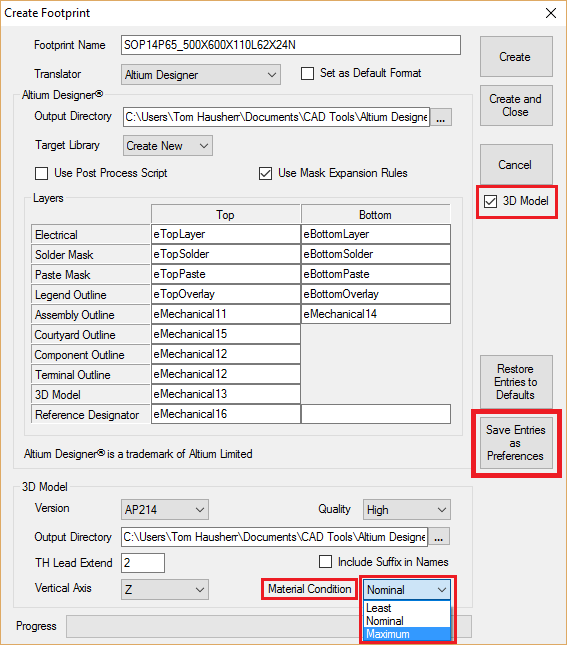 |
|
|
|
|
Nick B
Admin Group

Joined: 02 Jan 2012 Status: Offline Points: 1987 |
Post Options
Thanks(0)
Quote Reply
Posted: 11 Jul 2018 at 10:53am |
|
Jon, I'll contact you offline to clarify.
|
|
|
|
|
Post Reply
|
|
| Tweet |
| Forum Jump | Forum Permissions You cannot post new topics in this forum You cannot reply to topics in this forum You cannot delete your posts in this forum You cannot edit your posts in this forum You cannot create polls in this forum You cannot vote in polls in this forum |


 Topic Options